This post contains affiliate links. We may earn a small commission when you buy through our links — at no extra cost to you.
The drone comes out of the box on a birthday morning, lifts off in the living room, clips the ceiling fan, and lands in the dog’s water bowl — and that’s the good version. The bad version is the one that drifts over the fence in a stiff breeze, or dies after six minutes with a crying kid holding the controller. A drone that’s genuinely built for kids solves both problems: it survives the crash, and it flies long enough that the walk outside was worth it.
Four months and 14 drones later, the pattern was clear. My test pilots barely registered the camera specs, but prop guards, a second battery in the box, and a controller sized for small hands decided which one got picked up again the next day. We flew in backyards, at the local park, and across the living room on rainy afternoons, and the best of them were the ones a kid could get airborne without an adult reading the manual first — and the ones that still felt worth the money after the fourth crash. The picks below are sorted by who they suit.


Best for Budget Travel
Holy Stone HS190
Key Features
- Range: 96 feet
- Camera: 480p
- Weight: 1.34 oz
- Batteries: 1
- Price: Budget
The HS210 is the one we hand over first. It weighs 50 grams and measures about three inches across, so it fits a child’s palm, and the full propeller guard makes a wobbly landing less likely to end in tears. One-key takeoff and landing, altitude hold, headless mode, and three speeds are the beginner aids that matter: they let a first-time pilot fly before they have mastered the sticks.
What we appreciate most is the three-battery kit. A nano like this runs in short bursts, and having spares means a session can move from child to child without a long wait at the charger. The controller is simple enough to hand over without a lecture, and the 160-foot range is more than enough for indoor circuits or a still backyard. The low speed is also a useful handoff setting before a child is ready to chase the ceiling.
The HS210 is an indoor drone first. A 50-gram body gets pushed around by a breeze, so an open yard is where a new pilot’s confidence can disappear. Keep it in the living room, a garage, or a sheltered patio, and it is the least intimidating way into flying that we tested.
Pros
- Full propeller guard for indoor crashes
- Three batteries keep sessions going
- Simple beginner controls
Cons
We recommend the HS210 as the default first drone for young kids: it’s palm-size, fully guarded, and comes with three batteries to keep a session moving.
Best for Light-Up Flights
HASAKEE Q9s
Key Features
- Flips: 360-degree
- Camera: 720p
- Batteries: 2
- LED lighting: Green and blue
- Price: Midrange
The Q9s makes its case before it leaves the ground. Green and blue LEDs run through the frame, so a child can track it against a dark ceiling or a dusk lawn, and the 6.9-inch body with four guards feels a little more substantial than the palm-size nanos. That extra size is not a burden indoors; it makes the drone easier to spot when it is drifting toward a lamp.
We like it as the light-show pick: 360-degree flips, auto rotation, three speeds, and headless mode keep the controls relative to the pilot. The 720p camera is a bonus for silly aerial clips, not a reason to choose this over a camera drone. Two 500mAh packs are the practical part, since they let you swap and keep the show going.
It is a toy-flight experience, not a camera platform. The Q9s is at its best when the point is the spectacle: lights, flips, and a child laughing at the ceiling. If the goal is smooth video, the camera picks here make more sense; if the goal is a rainy-day indoor toy that announces itself, this one earns its place.
Pros
- Bright LEDs track well in low light
- Two batteries extend play
- Flips and auto rotation add fun
Cons
- Short per-pack flight time
We recommend the Q9s for kids who want a bright, attention-grabbing flyer; the LEDs and flips are the draw, not the 720p camera.
Best for Budget Travel
Holy Stone HS190
Key Features
- Range: 96 feet
- Camera: 480p
- Weight: 1.34 oz
- Batteries: 1
- Price: Budget
The HS190 is the one we tuck into a bag. It weighs 38 grams, folds down small, and keeps the controller simple, so it works as a travel toy rather than a shelf piece. That matters for a first drone: if it has to be packed carefully and flown in a field, it goes out less. This one can come along to a picnic and take up almost no room.
The controls are the right kind of boring: one-key takeoff, altitude hold, headless mode, and three speed steps. There is no phone pairing and no app to update before a flight. For the youngest pilots, that is a real advantage; the controller is the whole interface, and the aircraft is light enough that a bump against a wall is not a crisis.
It is also the cheapest way into the group, and the savings show in the kit. We treat it as a first taste of flying rather than the long-term family drone. The small body is easy to lose in tall grass, and the camera is not the reason to buy it. But for a child who just wants to buzz around a room, it does the job without fuss.
Pros
- Folds small for travel
- Light 38-gram body
- Simple one-key controls
Cons
- Only one battery included
- 480p camera is low resolution
We recommend the HS190 for families who want the smallest, simplest first drone and don’t need a camera to have fun.
Best for Indoor Obstacle Avoidance
SYMA X100
Key Features
- Batteries: 2
- Sensor range: About 12 in
- Obstacle sensing: 4-way infrared
- Propeller guards: Full guard
- Price: Midrange
The X100 is the indoor pick we trust around furniture. Four infrared sensors watch for obstacles about a foot ahead, and the full guard wraps the props. That is not autopilot; it is a last-second cushion for a child who has not mastered the right stick yet. In a room with chairs and a sofa, that cushion is the difference between a near miss and a rescue mission.
We like the way the X100 turns a small room into a game. One-key takeoff, altitude hold, headless mode, and 360-degree flips are all there, and the 5.16-inch body is small enough to fly between chairs without feeling like a hazard. Two batteries are included, which is the right call for short indoor turns.
The controls are the part to watch. The X100 rewards gentle inputs and can feel awkward if a child expects a video-game stick to do the work. For a 6- to 9-year-old who needs the guard and the sensors more than speed, that is a fair trade. It is also a better fit for a living room than a windy park.
Pros
- Full propeller guard
- Obstacle avoidance for tight rooms
- One-key takeoff and stable hover
Cons
- Short battery life
We recommend the X100 for indoor-first families: the full guard and obstacle sensors make tight-room flying less nerve-racking for younger kids.
Best for Camera Value
RELIDOL X62
Key Features
- Range: 30 meters
- Camera: 1080p
- Weight: 4.06 oz
- Batteries: 2
- Price: Midrange
The X62 is the camera drone we feel comfortable handing to an older child. It weighs 4.06 ounces, folds down, and carries a 1080p camera on an 80-degree adjustable mount. That combination gives an older child a camera drone that is light enough to manage and useful enough to make a first aerial video.
We like the two control routes. A child can use the remote, or an adult can hand over a phone for app control and FPV. The 30-meter range is a backyard number, not a distance record, and the two batteries are the difference between one flight and a proper session. The folding body also means it can live in a backpack without a special case.
This is a better fit for a 9- or 10-year-old who can fly with some care than for a rough-and-tumble 6-year-old. The camera is the point, so the child needs enough patience to line up a shot rather than just chase the ceiling. For a first camera drone, that is a reasonable ask.
Pros
- 1080p adjustable camera
- Light 4.06-ounce body
- Remote and app control
Cons
- Hard landings can break it
We recommend the X62 for older kids who want to shoot video: it’s light, easy to control, and carries a real 1080p camera.
Best for No-Phone Flying
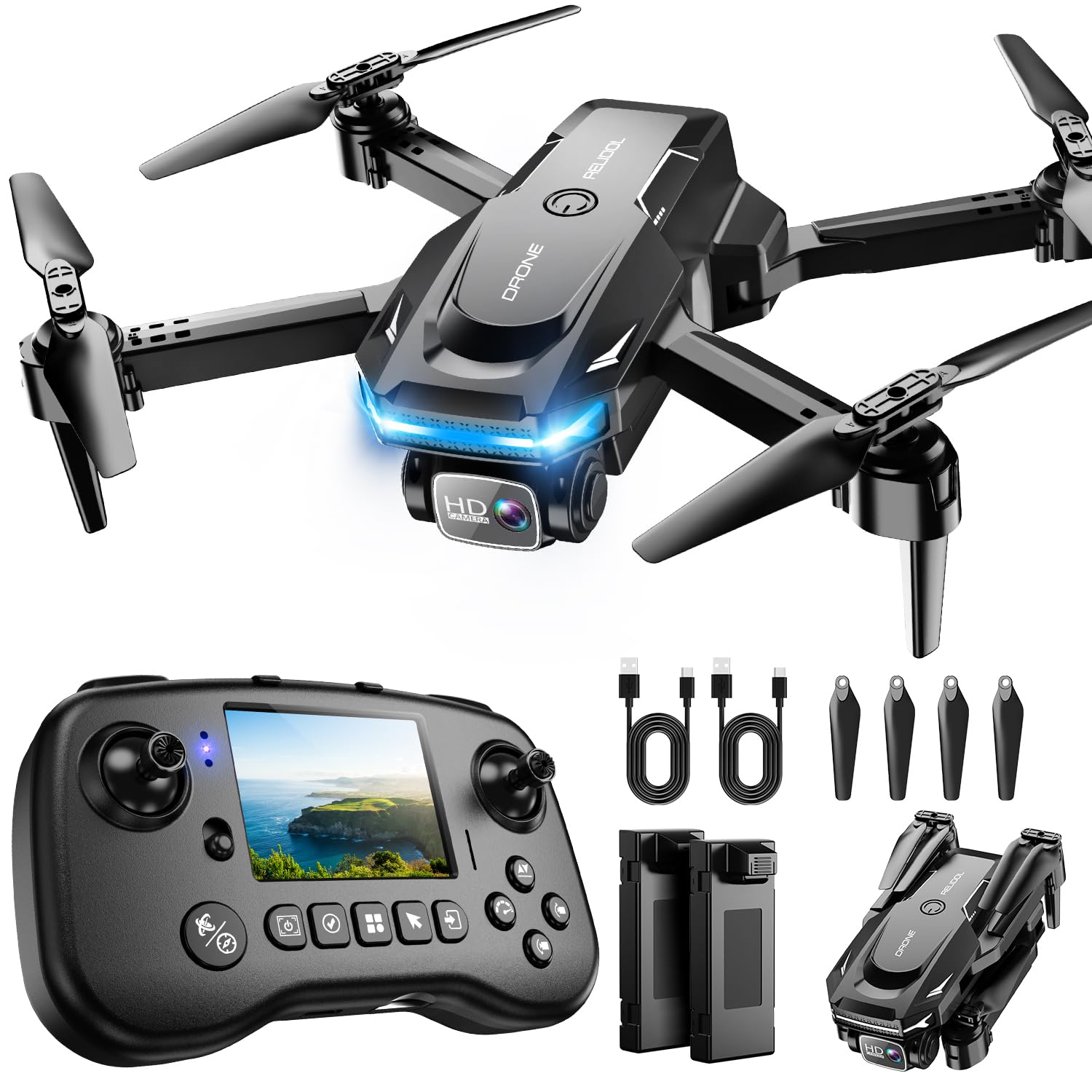
RELIDOL PK01
Key Features
- Range: 30 meters
- Camera: 1080p
- Batteries: 2
- Controller screen: Built-in
- Price: Premium
The PK01 solves a specific family problem: the phone. Its controller has a built-in screen, so live video and flight stats sit in the pilot’s hands without a handset, an app login, or a parent’s device disappearing into the yard. That sounds like a small convenience until you have tried to keep a child, a controller, and a phone pointed at the same drone.
We like the rest of the package too. The 1080p camera is adjustable, the drone folds, and two batteries stretch a session. The screen is the reason to pay the premium; the flying experience is beginner-friendly rather than magical. It is a camera drone for families who want fewer moving parts, not a cinematic tool.
There is a practical catch: recording needs a microSD card, and the card is not part of the flying kit. Add one before the birthday morning, or the screen is a live viewfinder without a save button. For a family that wants the simplest camera setup, that is a small piece of homework. For a family that already owns a card, it is barely a speed bump.
Pros
- Built-in screen needs no phone
- Adjustable 1080p camera
- Two batteries for longer sessions
Cons
- Camera is 1080p, not 2K
We recommend the PK01 for families who want camera flying without a phone: the built-in screen is genuinely useful, and the 1080p footage is a bonus.
Best for Older Kids
Loiley X69

Key Features
- Camera: 2K
- Weight: 16 oz
- Batteries: 2
- Folded size: 5 x 3 x 2 in
- Price: Midrange
The X69 is for the older kid who wants the best footage in the group. Its 2K camera is a step up from the 1080p cameras here, and the folding body comes with a carrying case, so it travels like a camera drone rather than a toy. The case is not a throwaway extra; it gives the whole kit a home and makes the drone easier to bring along.
We appreciate the beginner scaffolding: one-key start and landing, headless mode, altitude hold, two batteries, and propeller guards. It is a more serious package than the palm-size flyers, and that is the point. The controller and battery routine feel closer to a camera drone, which suits a child who wants to make videos rather than just chase the cat.
The trade-off is size. The X69 is a 16-ounce drone, and a younger child will feel that weight in every correction. It makes the most sense for a 10- to 12-year-old who will treat it as a camera tool, not a crash-test toy.
We think it earns its place as the older-kid camera pick, not as the family’s first indoor toy. If the child is ready to frame a shot and land carefully, the 2K footage and case make the extra bulk worthwhile.
Pros
- 2K camera with adjustable angle
- Carrying case included
- Two batteries and propeller guards
Cons
- Motor failures can ground it
We recommend the X69 for older kids who care about video: the 2K camera and case make it feel like a real camera drone, not a toy.
How We Tested 14 Kid Drones (and Crashed Most of Them)
We started with every kid-oriented drone we could find, then cut anything without prop guards, anything that needed a smartphone just to take off, and anything whose spare props and batteries weren’t sold separately. That left 14, tested over four months in backyards, at a local park on weekend mornings, at two birthday parties, and across the living room on rainy afternoons.
The first thing I timed was the gap between box open and first flight, with kids ages 6 to 11 working without help. I noted who reached for the manual, who gave up, and which controllers fit small hands without a death grip. Then I watched which ones they came back to on their own — a drone nobody wants to fly twice isn’t much of a drone, whatever it claims on the box.
Battery life got a stopwatch rather than a spec sheet: I ran each one from takeoff to forced landing, timed the recharge, and counted how many batteries came in the box, since six minutes of flight is a very different proposition with one battery than with three. Flight performance meant flying in a real breeze to see whether the drone held its altitude or drifted toward the fence, and whether the return button actually brought it back to the launch point. After every session we re-paired everything, and a month in we noted which ones still bound to the controller on the first try.
Durability was the fun part. We let them hit the fence, drop from six feet onto grass and onto driveway, and clip a maple’s low branches, then checked props, motor mounts, and body cracks after each hit. For value, we laid out everything in the box and weighed it against how the drone flew in week one versus week twelve. The ones that survived all of that are the ones below.
How to Choose a Drone for a Kid
The right kids’ drone is the one your child can launch, bump, and launch again without an adult rescuing it, so the buying decision starts with guards, weight, and simple controls, not the camera.
Start with guards and a weight that suits your room
A full propeller guard is the first thing we look for. It turns the blades into a protected disc, so a wall bump is less likely to chip a prop or nick a finger. Weight matters just as much: the 38- to 58-gram nanos here are indoor toys, while a 16-ounce camera drone behaves like a different class. If your child will fly between furniture, choose the light, guarded end and keep the camera for later.
Match the controls to the child
One-key takeoff, altitude hold, and headless mode are not marketing garnish; they remove two things that make a first flight frustrating: keeping height and remembering which way the drone faces. Obstacle sensors add another cushion, but the X100’s sensors reach only about a foot ahead, so they are a last-second brake, not a force field. For a 6- to 8-year-old, these aids matter more than top speed. For a 10-year-old, a camera drone with three speeds may hold attention longer.
Count battery packs, not big flight-time claims
Toy drones run in short bursts, and the advertised total usually assumes perfect conditions and a fresh pack. The useful number is how many batteries come in the box. Three packs, as on the HS210, let one child fly while another waits, and they keep a birthday session from collapsing after one turn. A single-pack model like the HS190 is cheaper, but budget for a spare if the drone will be shared.
Decide whether you want a camera at all
A 480p or 720p camera is a novelty: fine for silly clips, not for making a video worth keeping. If your child really wants aerial footage, move up to 1080p or 2K and accept a heavier drone. Then choose the control route: a phone app adds a device to manage, while a screen controller like the PK01 keeps everything in one hand. A microSD card is easy to forget, so put one in the box before the first flight.
Fly indoors first, and treat wind as the off switch
Even a light breeze can push a 50-gram drone off course, and a child who is still learning will struggle to bring it back. Start in a room with clear space, low speed, and a parent spotting. Outdoors, wait for still air, keep the drone in sight, and treat the range figure as a ceiling rather than a challenge. The backyard is a reward for good control, not the first lesson.
Frequently Asked Questions
What do altitude hold and headless mode actually do?
Altitude hold keeps the drone at a steady height when the child lets go of the throttle, which removes the constant up-down correction. Headless mode makes the controls relative to where the pilot is standing rather than where the nose points, so pushing forward sends the drone away from them. Together they make a first flight feel less like a video game and more like a toy.
What should we do before the first flight?
Charge the battery, fit the guards, and read the controller layout before the child takes over. Start indoors on the lowest speed, keep the drone in front of you, and land before the low-battery alarm becomes a surprise. A short test flight in your own hands is the fastest way to find a stuck stick, a loose prop, or a pairing problem.
Are spare propellers worth buying?
Yes, if the drone will be shared or flown near walls. Most kits include a spare set, but props are the first part to chip, and a child who has to stop flying because of one blade loses interest fast. Match the replacement to the model, keep the spares with the controller, and replace a chipped prop before the next flight rather than straightening it.
Can two children share one drone?
Yes, if you make turns part of the game. Give each child one battery, start on low speed, and have the waiting child stay behind the pilot rather than chasing the drone. The palm-size models are light enough to pass around, but two sets of hands on one controller causes more crashes than the flying itself. Land between pilots and reset the controls.
Final Verdict
The Holy Stone HS210 is the drone we recommend first. It’s the easiest of the group to hand to a young child: light, fully guarded, and backed by three batteries, so a short run doesn’t end the afternoon.
If your child will fly mostly in a busy living room, the SYMA X100’s obstacle sensors and full guard are the calmer choice. If you want video without handing over a phone, the RELIDOL PK01’s built-in screen is worth the step up.