This post contains affiliate links. We may earn a small commission when you buy through our links — at no extra cost to you.
Most kid-friendly drones claim flight times of 20 minutes, but each battery pack lasts only 5–8 minutes in practice. That means constant swapping if you buy a single-battery model — and a few hard landings can ground the drone permanently. The real measure of a good kids’ drone is not just its price tag but how many batteries it includes and how well it handles crashes.
The drones in this guide share three common features: altitude hold for stable hovering, propeller guards to protect fingers and furniture, and multiple batteries to stretch total playtime. While no sub-$50 drone is indestructible, the picks here are selected for their ability to survive the learning curve and keep flying session after session. Whether your child wants flips, a camera, or simply a safe introduction to flight, these options cut through the noise of overpromised specs.



Best for First-Time Pilots
Holy Stone HS210
Key Features
- Flight Time: 21 min, 3 batteries
- Ease of Use: Altitude hold, headless
- Safety: Propeller guards, altitude hold
- Camera: 1080p basic
- Durability: Moderate
- Price: $
The Holy Stone HS210 comes with three batteries, each offering 5–7 minutes of flight, so total playtime can stretch beyond 15 minutes without waiting for a recharge. Altitude hold and headless mode keep the drone stable and oriented correctly, which cuts the learning curve for first-time pilots. Propeller guards protect walls and furniture during inevitable crashes. The trade-off: individual battery life is short, so swapping packs is part of every session, and a small number of units develop motor issues after a few flights.
This drone is best for kids ages 6–12 flying indoors or on calm, sheltered days. The size is small enough to maneuver in living rooms but too light for outdoor breezes. If you need sustained flight on a single battery or plan to fly in wind, look elsewhere. For families wanting a safe, low-stress introduction to quadcopters, the HS210 delivers consistent fun with minimal frustration.
Pros
- Three batteries extend total playtime without recharging stops.
- Simple controls and altitude hold make it easy for kids to fly.
- Fun 3D flips and auto rotation keep young pilots engaged.
Cons
- Each battery lasts only 5–7 minutes; frequent swaps required.
- Occasional quality variance; some units stop working after a few uses.
Buy this if you want a low-risk, fun starter drone for kids and have calm indoor spaces. Skip it if you need sustained flight on a single charge or plan to fly outdoors regularly.
Best for Safe Indoor Play
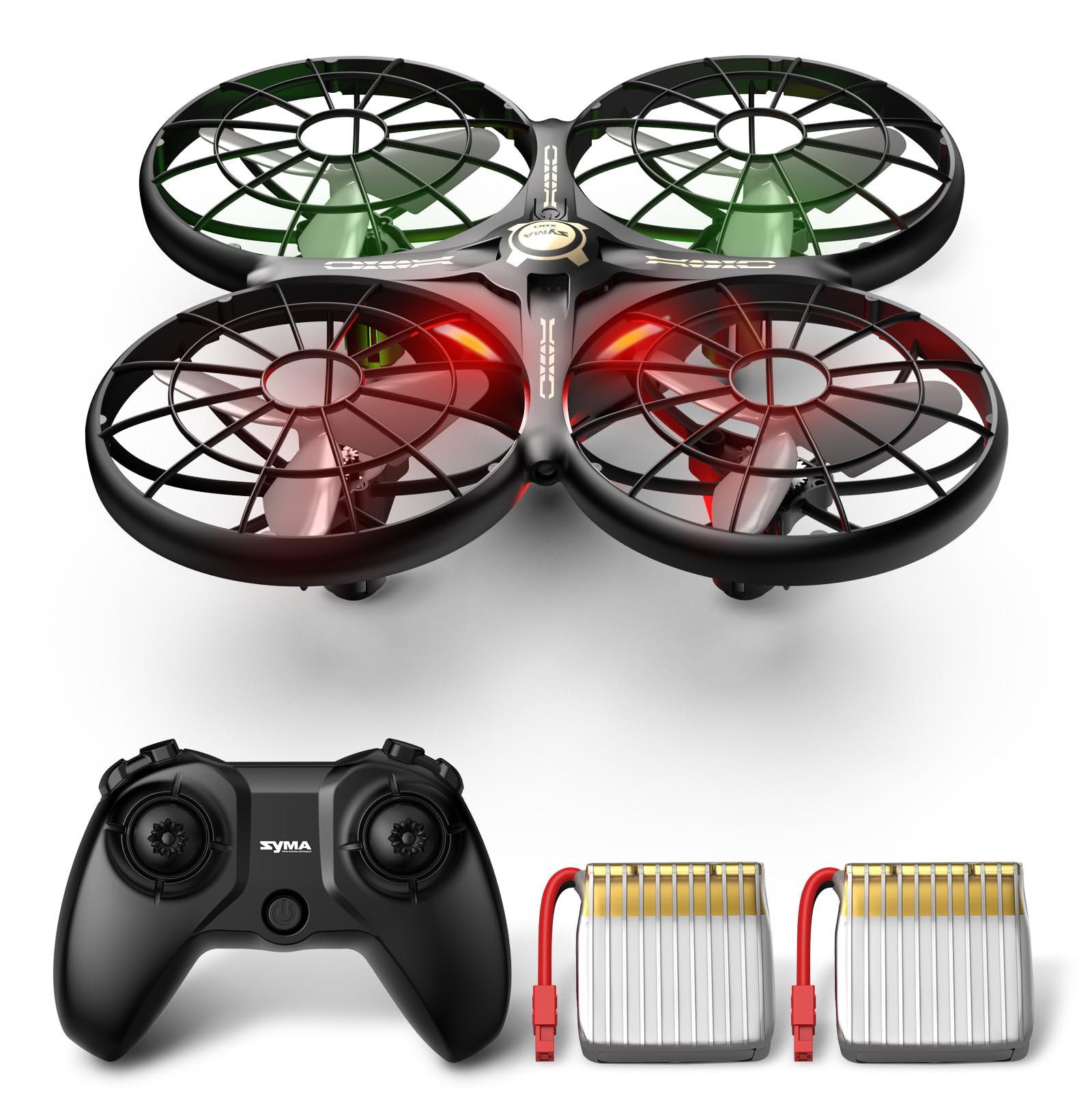
SYMA X100
Key Features
- Flight Time: 20 min, 2 batteries
- Ease of Use: Altitude hold, headless, 2 speeds
- Safety: Infrared obstacle avoidance, guard
- Durability: Crash-resistant
- Price: $$
The SYMA X100 trades a camera and extended range for crash-proof indoor flying. Its infrared obstacle detection automatically steers the drone away from walls and furniture — a genuine safety net for younger pilots. The enclosed guard protects propellers from direct impacts, making it far more forgiving than uncovered drones. Two batteries deliver about 20 minutes total flight time, though each pack runs roughly 7–10 minutes, which some families wish were longer. Controls include headless mode and altitude hold, but absolute beginners may need a few flights to get the hang of steering. Compared to the top pick, you lose the extra battery and simpler controls in exchange for superior crash prevention. Best for parents who prioritize indoor safety over camera features or longer single-session play.
Best suited for families where the drone will fly near furniture or other obstacles, and where crash damage is a bigger concern than flight duration. Not ideal for kids who want a camera or outdoor flying.
Pros
- Infrared obstacle avoidance and full guard reduce crash risk indoors
- Easy altitude hold and headless mode help beginners hover steadily
- One-key 360° flips are reliably fun with stable recovery
Cons
- Each battery provides only 7–10 minutes of flight time
- Steering has a modest learning curve for absolute beginners
Buy this if you want the safest indoor drone for kids learning to fly and you aren’t looking for a camera or extended outdoor range.
Best for Kids with Camera
Pallton X80
Key Features
- Flight Time: 24 min, 2 batteries
- Ease of Use: Altitude hold, headless, one-key
- Safety: Propeller guards, altitude hold
- Camera: 1080p HD, FPV
- Durability: Solid build
- Price: $
The Pallton X80 stands out in the budget segment with a usable 1080p camera, FPV streaming, and a foldable frame that packs into the included carrying case. Setup is straightforward, and the two modular batteries provide about 24 minutes of total flight time. Compared to the top pick, it has fewer customer reviews, so long-term durability is less documented, and the controls have enough features that it’s best suited for kids ages 7 and up rather than very young children. The build quality feels solid, and the camera delivers surprisingly clear shots for the price — ideal for outdoor family fun where portability and affordable aerial video matter more than extended per-battery runtime.
Pros
- Genuine 1080p video with FPV streaming at this price point.
- Foldable design with carrying case for easy transport.
- Quick setup and beginner-friendly flight modes.
Cons
- Battery life per charge is moderate; two batteries help but still modest.
- More complex controls than basic toy drones, not ideal for ages 4–6.
Buy this if you want a budget-friendly drone with usable 1080p video and foldable portability for family outdoor fun. Skip it if you need ultra-long flight time per charge or a simpler drone for very young children.
Best for Very Young Kids
Holy Stone HS190
Key Features
- Flight Time: 7-8 min, 1 battery
- Ease of Use: Altitude hold, headless, emergency stop
- Safety: Propeller guards, altitude hold, stop
- Durability: Mixed
- Price: $
Unlike the top pick which packs three batteries, the HS190 prioritizes portability above all else—the drone collapses into the remote to fit in a pocket. This trade-off means a single battery giving 5–8 minutes of flight time and no camera. Build quality is mixed, with some units losing propellers after minor crashes, and the lightweight design makes outdoor flights risky. For indoor play, travel, or as a very young child’s first taste of flying, the convenience of instant pocketability outweighs the limitations.
Pros
- Folds inside controller for true pocket portability
- Simple enough for kids as young as 5 with altitude hold and headless mode
- Fun 3D flips and adjustable speed keep young pilots engaged
Cons
- Short 5–8 minute flight time per charge limits play sessions
- Some units show fragility after crashes; propeller guards help but don’t guarantee durability
Buy this if you need an ultra-portable first drone for a young child that fits in a pocket for travel. Skip it if you expect longer flight sessions or want to fly outdoors regularly.
Best for Led Night Fun
HASAKEE Q9s

Key Features
- Flight Time: 12-14 min, 2 batteries
- Ease of Use: Altitude hold, headless
- Safety: Full propeller guards, altitude hold
- Camera: 720p basic
- Durability: Durability concerns
- Price: $
The Q9s delivers on its LED light show, with bright green and blue lights that kids enjoy in low light. It’s easy to learn with altitude hold and headless mode. However, battery life per pack is only about 6 minutes, and the drone can drift or break from light crashes, making it better for occasional indoor fun than daily outdoor play.
Pros
- Bright LED lights make nighttime flying a delight for kids and adults alike.
- Easy to learn with altitude hold and headless mode.
Cons
- Each battery provides only about 6 minutes of flight, requiring frequent swaps.
Worth considering if your child loves LED light shows and flies mostly indoors with gentle control.
Best for Budget Camera Drone
Swifsen SWA35

Key Features
- Flight Time: 15 min, 2 batteries
- Ease of Use: Altitude hold, headless, one-key
- Safety: Propeller guard with top cover
- Camera: 720p
- Durability: Durability concerns
- Price: $
The Swifsen SWA35 delivers a 720p camera and easy controls like altitude hold and one-key takeoff at a low price, making it approachable for kids learning to fly indoors. However, battery life runs about 5–7 minutes per pack, and some units arrive with motor or battery failures. Durability is also limited—propeller guards can break after a few crashes. It’s a reasonable starter if expectations are modest, but reliability issues and short flight time prevent it from competing with more consistent options like the Holy Stone HS210.
Pros
- Great for kids – easy to control and entertaining.
- Easy setup and operation for beginners.
Cons
- Short battery life (~5–7 minutes per pack) requires frequent battery swaps.
Worth considering if you want an affordable indoor camera drone for kids to learn basic flight, and you’re prepared for short flights and occasional quality variances.
How to Choose
The most common surprise for new drone buyers is that each battery provides only 5–8 minutes of flight, so total playtime depends on how many batteries are included.
Flight Time
Multiple batteries are essential; a single battery gives less than 10 minutes of play. Look for drones with at least two batteries to get 15–20 minutes of total flying.
Ease of Use
Altitude hold keeps the drone at a steady height, headless mode prevents disorientation, and one-key takeoff simplifies launching. These features make the difference between a frustrating toy and a fun first experience.
Safety Design
Propeller guards protect fingers and furniture, while obstacle avoidance sensors help prevent crashes indoors. Full enclosed guards are best for young kids.
Camera Quality
Cameras on budget drones are basic – typically 720p or 1080p with shaky footage. It’s fine for fun memories but not for quality photos. Decide if a camera is necessary; many kids enjoy flying without one.
Durability
Toy drones are not indestructible. Expect some breakage after crashes. Models with stronger build quality and replaceable parts survive longer. Avoid drones with many reports of motors failing early.
FAQ
How long does a kids drone battery actually last?
Each battery typically provides 5–8 minutes of flight. Drones that advertise longer total flight times include multiple batteries that you swap. For example, a drone claiming 20 minutes often comes with two or three batteries.
Why does my kids drone keep flying away or losing control?
Most budget drones lack GPS and are unstable in wind or open areas. Outdoors, even a light breeze can cause drift. Fly indoors or on calm days, and use headless mode to maintain orientation.
Are toy drones safe for indoor use with young children?
Drones with propeller guards and obstacle avoidance are safe for indoor use. Always supervise young kids. Models with enclosed blades or full guards reduce the risk of injury and furniture damage.
What is the best drone for a 6 year old beginner?
Look for a drone with altitude hold, headless mode, and propeller guards. Models like the Holy Stone HS210 or SYMA X100 offer these features and are well-suited for beginners.