This post contains affiliate links. We may earn a small commission when you buy through our links — at no extra cost to you.
The box arrives, the kid is thrilled, and forty minutes later I’m the one hunched over a bag of tiny screws while they’ve drifted off. That scene repeated itself enough in my house that it became the first thing I check in a robotics kit: can a child get from sealed box to something that actually moves without a grown-up doing the interesting parts? The right kit hands the work, and the bragging rights, back to the kid.
My team and I built our way through a dozen kits over the past seven months with kids roughly eight to twelve, and the gaps showed up fast. Price told us very little; the ones that held attention had picture-led instructions, parts that went together without a fight, and a first build that did something within the hour. We also kept every kit in a playroom bin and rebuilt with it weeks later, which is where a few quietly fell apart. The picks below survived that second round.



Best for First Coding Robot
Makeblock mBot Robot Kit
Key Features
- Power: Rechargeable lithium-ion
- Coding: Scratch and Arduino
- Build time: About 15 minutes
- Recommended age: 8 years and up
- Price: Midrange
Fifteen minutes is the number that matters here. That’s the build the mBot asks for — chassis, two wheels, a control board, a handful of screws — and then there’s a robot on the floor while a child’s attention still has somewhere to go. We think that short build is the smartest thing about it. The kit that ends up in a cupboard is rarely the one that was too simple; it’s the one that was still half-finished three weeks later.
What keeps it out of that cupboard is the second act. Scratch blocks snap together into behaviour — drive forward for a second, spin when the sensor sees a wall — and Arduino is waiting underneath once block coding runs out of challenge. Of everything in this group it’s the straightest line from ‘I built this’ to ‘I made it do that’, and the eight-and-up rating means a third grader can start with a parent in the room and still be using it at eleven. Add-on packs extend it further if the interest sticks.
So do this before you wrap it: pair the Bluetooth yourself once, and check the app on the exact tablet or laptop it’ll be used with. Five minutes there saves a disappointed morning, and after that the kit delivers everything it promises.
Pros
- Builds in about fifteen minutes
- Scratch blocks first, Arduino later
- Rated for ages 8 and up
- Add-on packs extend the projects
Cons
- Bluetooth pairing is the weak link
Our pick for most families: minutes to build, years of coding to grow into, and one connection quirk to test before you hand it over.
Best for Aspiring Arduino Coders
ELEGOO UNO R3 Robot Car
Key Features
- Camera: Wi-Fi FPV module
- Sensors: Ultrasonic and line-tracking
- Controller: Arduino UNO R3
- Recommended age: 12 years and up
- Price: Premium
The box is the argument: acrylic plates, four motors, an Arduino UNO R3 board, an ESP32 camera module, an ultrasonic sensor and a line-tracking array, all of it ending up as a car you steer through an app while watching a live feed from the front bumper. If a child has started asking how a sensor knows where the wall is, this is the kit that answers with something they can drive.
It’s an afternoon build rather than a fifteen-minute one, and the keyed connectors are what make that afternoon go well — the wiring plugs in only one way, so a first electronics project is much less likely to end in tears. Then comes the layer under the driving: line following, obstacle avoidance, follow-me mode, and the Arduino sketch behind all of it. That’s the most complete robot in this set, and the point where a twelve-year-old learns to program rather than to press buttons.
Two frictions are worth knowing about. The written steps are uneven — some are crisp, others assume you already see why a wire runs where it does, so plan to sit alongside for the first half hour. And the Wi-Fi handshake between the app and the camera is the fiddly part; get the app running on your own phone before the first session rather than during it.
Pros
- Keyed connectors make wiring hard to get wrong
- Live camera, line tracking and obstacle avoidance
- Real Arduino IDE coding
- Rechargeable, with a battery in the box
Cons
- Rated 12 and up, so younger kids need help throughout
The one we recommend once a kid is ready to read a wiring diagram and debug: more robot, more code and more satisfaction than anything else in this group.
Best for Younger Builders
Sillbird 5-in-1 Robot Kit
Key Features
- Power: Rechargeable battery
- Models: Five
- Pieces: 488
- Control: App and remote
- Price: Midrange
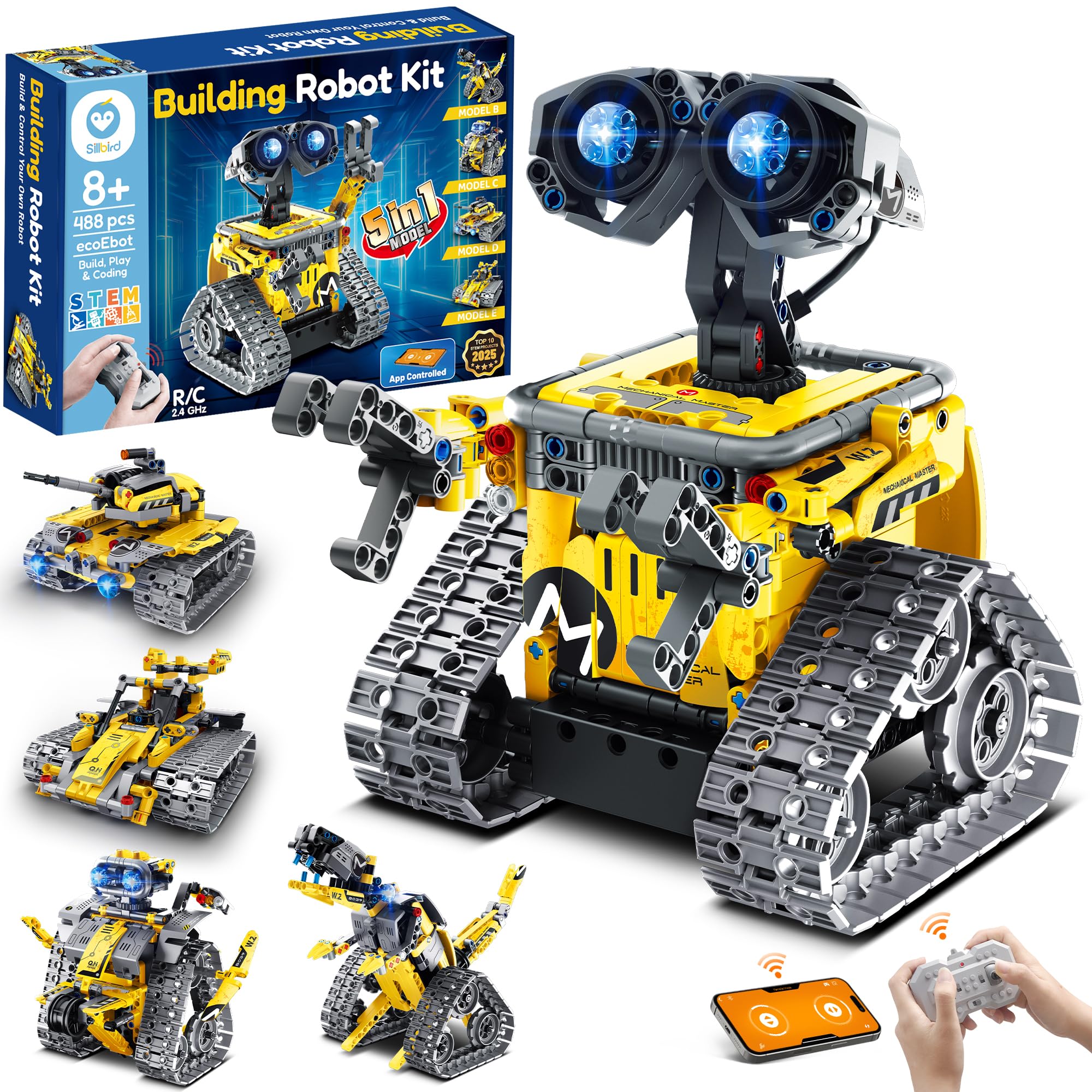
Four hundred and eighty-eight pieces is a lot of plastic to sort before anything moves, and that’s the deal this kit offers: the build is the main event, not the warm-up. Five models come out of the same box — a robot, a dinosaur, a car, a tank and more — and they’re ordered by difficulty, so a child who has never finished a big set can start with the simplest one and work up.
There’s no wiring and no code to read. You steer with the remote or a phone app, and the ‘programming’ is a path you trace with a finger before the robot follows it. That’s a real limit if your kid wants to write logic — it’s why the mBot takes the overall spot — but as a first big build with a payoff at the end, it’s the one we give to a younger child. A set that keeps producing new robots from the same pile of parts earns its shelf space.
Two things to prepare for. The instructions go dense where the gearbox and motor housing come together, so expect to be called over for the fiddly quarter. And get the remote and the app both paired before the birthday morning rather than during it — the remote is the fallback worth keeping charged.
Pros
- 488 pieces and five different models
- Remote and app control, no coding needed
- Builds get harder as you go
Cons
- Path drawing stands in for real programming
- Remote and app pairing can be unreliable
For an eight-to-eleven-year-old who wants to build something big and then drive it around the kitchen, this is the set we hand over first.
Best for Screen-Free First Build
Smartivity Robotic Hand
Key Features
- Material: Engineered wood
- Batteries: None required
- Recommended age: 8 to 14 years
- Replacement parts: Lifetime supply
- Price: Budget
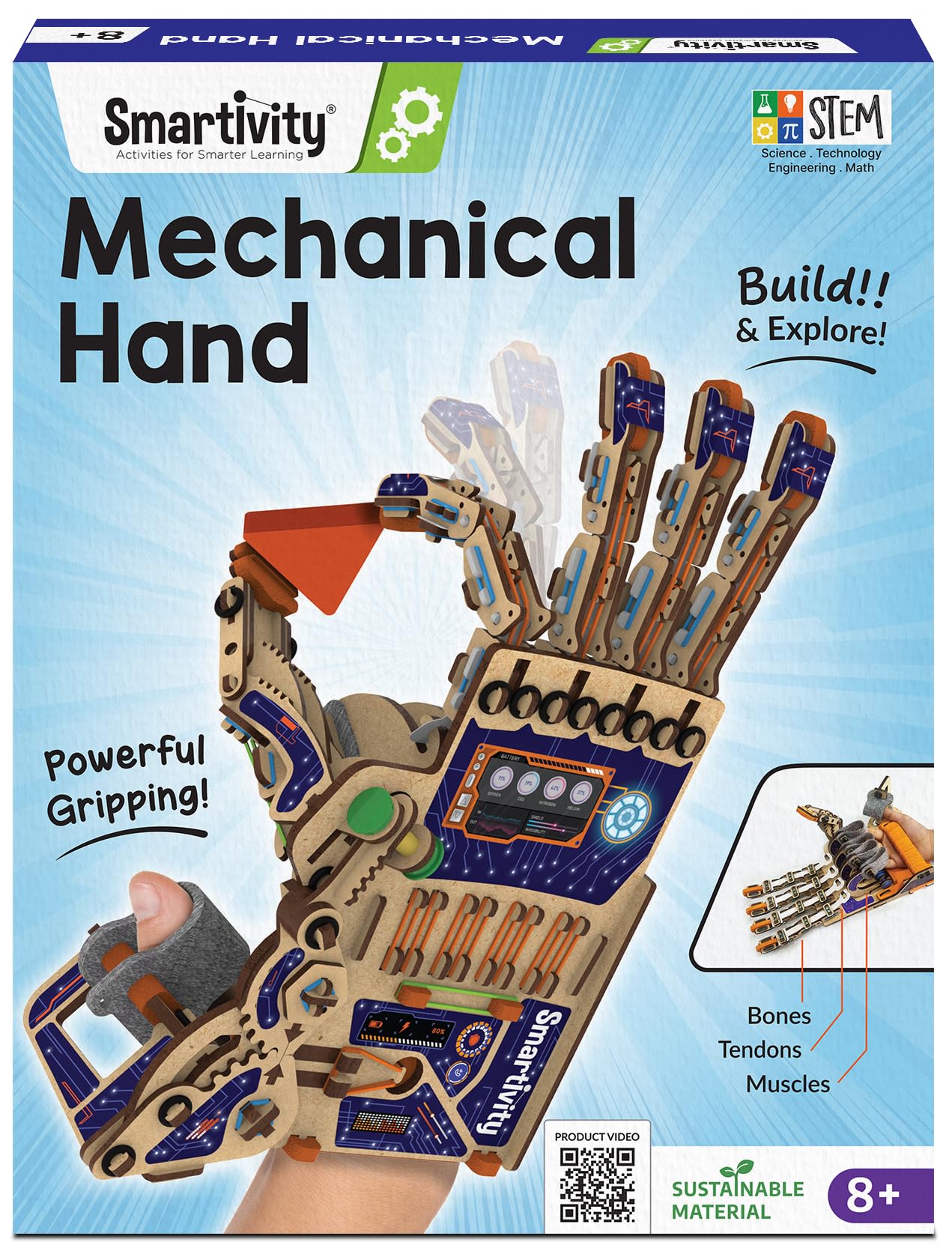
The build ends with a kid wearing a wooden hand that closes when they curl their fingers. That’s the whole trick: the thing they made becomes the thing they use, with rubber-band tendons running from the finger joints to a harness on the forearm. No motors, no batteries and no screen at any point in the process — it’s the kit here we reach for first when the child is eight or nine and the adults would rather not add another device to the house.
Two details earn it a place beyond the novelty. The parts are engineered wood rather than plastic, which gives the finished hand a look that survives being left on a shelf; and spare pieces are free for the life of the kit, so a snapped connector is a five-minute fix rather than the end of the project. We also like that it’s a one-sitting build. Nothing about it drags into a second weekend, which is exactly what an eight-year-old needs.
The knuckles are the hard part. They’re tight, they need a firm press, and younger children will hand that section straight to an adult. Keep the spare-parts bag somewhere you’ll remember, because the tension bands are the piece that gets the most punishment.
Pros
- Screen-free, battery-free build
- Free replacement parts for life
- A working hand you can wear
- Engineered wood, not plastic
Cons
- Tight joint work needs adult hands
We recommend it for the child who wants something to show off at dinner: a wooden hand they build in an afternoon and then wear for weeks.
Best for No-Screen Logic
Teach Tech Mech-5
Key Features
- Moves: Throws, lifts, kicks, draws
- Battery: 2 AAA batteries
- Programming: Snap-on coding wheel
- Recommended age: 10 years and up
- Price: Budget
Programming usually means a tablet, an app and an argument about screen time. The Mech-5 goes the other way: you snap pegs into a wheel on the robot, and the order you place them in is the program. One position throws, another lifts, another kicks or draws. Press start and the arm runs the sequence you built. It’s the most concrete demonstration of what code actually is that we’ve come across in this group — a list of instructions, executed in order.
The cost is the build. This is a snap-together plastic kit with a lot of small parts and a genuine multi-hour assembly, and it’s rated ten and up for a reason: a younger child loses the thread somewhere in the middle. Once it’s together it performs on a table — throwing, lifting, kicking, drawing — rather than driving around the yard. Two AAA batteries and no phone is all it needs to run.
Where it earns its spot is the second robot. Once a child has watched a peg sequence play out, the next question is what happens if you move one peg, and that’s the moment the abstraction clicks. Few kits here get a nine- or ten-year-old asking that question with no screen in front of them.
Pros
- Teaches sequencing with no screen or app
- Throws, lifts, kicks and draws
- Runs on two AAA batteries
Cons
- Multi-hour build before the first movement
Our choice when you want coding logic without a screen in the room: peg by peg, it shows that a program is just an ordered list of instructions.
Best for Wearable Hydraulic Build
Thames & Kosmos Mega Cyborg Hand
Key Features
- Power: Air and water pressure
- Joints: Adjustable finger angles
- Configurations: Right hand, left hand, claw
- Recommended age: 7 years and up
- Price: Budget
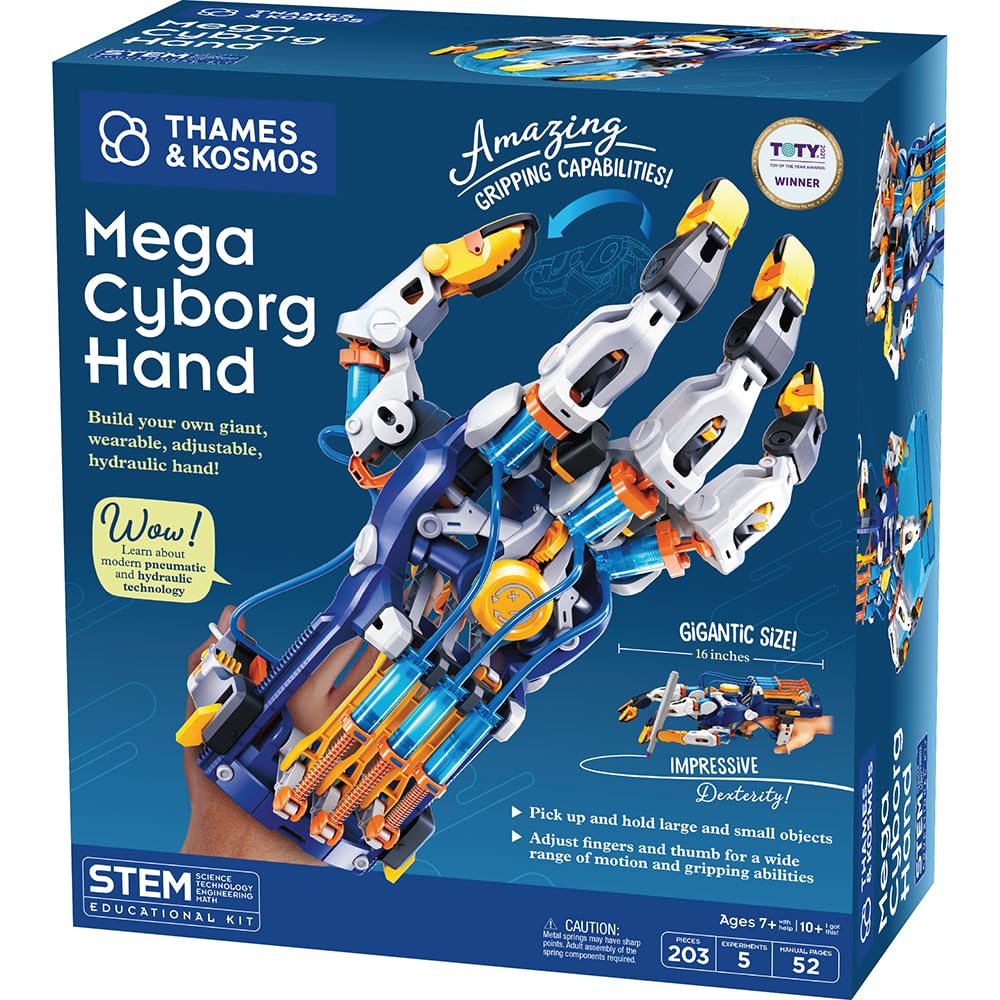
Air and water do the work. The Mega Cyborg Hand has no motor, no battery and no app: pistons filled with water, driven by air pressure, close the fingers hard enough to pick something up. It’s the only kit in this group that teaches hydraulics with something a child can wear, and it can be built as a right hand, a left hand, or a claw with the fingers angled differently.
The build is long, the pieces are small, and the tubing has to be seated and bled properly or the fingers go soft in the middle of a grip. Ages seven and up is optimistic — we put this at ten-plus in practice, with an adult handling the plumbing. Set it up on a tray so a dropped connector doesn’t disappear into the carpet.
What you get for the effort is an object that impresses adults. Kids show this one off, and the engineering lands because they can feel the resistance in their own fingers as the pistons take the load. It’s a demonstration model rather than a toy that survives a backyard.
So: buy it for the child who likes a project with real mechanism in it and will tolerate a slow build, and accept that you’re the one who fills and bleeds the lines. If the goal is a robot that moves on its own, this isn’t it — worth knowing before you wrap it.
Pros
- Hydraulic pistons, no batteries or app
- Builds as right hand, left hand or claw
- Adjustable finger joints
- Feels like real engineering in the grip
Cons
- Parts can snap during assembly
- Hydraulic lines need re-bleeding
Buy it for a ten-plus kid who likes a project with real mechanism in it, and be ready to do the plumbing and the filling yourself.
Best for Rainy-Day Projects
BeAndge 6-in-1 STEM Kit

Key Features
- Power: Alkaline batteries
- Tools: Mini screwdriver included
- Projects: Six
- Recommended age: 8 to 14 years
- Price: Budget
Six separate projects in one box is a different proposition from one big robot, and for some kids it’s the better one. There’s a reptile robot, a balance car, a bubble machine, a fiber lamp, a buzzer wire game and a sixth build in the same vein — small things, each finishable in an evening, each doing something visible when the last screw goes in.
The parts are ordinary plastic, a mini screwdriver comes in the box, and nothing needs an app, a phone or a login. That makes it the easiest kit here to hand to a child on a rainy afternoon, and the easiest to spread across a classroom table where several kids want a turn. Spare screws in the box are a small kindness that most kits this size skip.
The screws are also the catch. They’re tiny, they don’t always bite first time, and an eight-year-old will need someone to hold the parts while the thread catches — treat the age range as the point where a child can finish a build alone, not the point where they can start one. We’d rather have that friction than a kit that asks more and delivers less, but go in with patience and a clear table.
Pros
- Six different projects in one box
- No app, phone or screen needed
- Mini screwdriver included
Cons
- Tiny screws need adult fingers
Six short builds instead of one long one — our pick for a kid who loses momentum on big models, and for a classroom table with six pairs of hands.
How We Tested a Dozen Robotics Kits (With Kids Doing the Building)
We started by pulling every kit we could find that claimed a middle-school age range, then cut the list down using spec sheets and parent forums: what actually came in the box, whether the software ran on a school Chromebook or demanded its own tablet, how many builds the manual walked through, and whether replacement parts were sold separately. Anything that needed a specialty battery or a phone-only app got set aside early. That left twelve.
Testing happened at kitchen tables on rainy Saturdays and after school on weekdays, with kids building and adults taking notes instead of helping. We timed box-open to first working build and recorded who did which step — if a parent ended up doing the wiring, that counted against the kit. We followed the instructions the way a kid would, skipping ahead when they got impatient, and marked every place a step assumed knowledge that wasn’t there.
Then we left them alone with it. Each kit went into a playroom bin for a few weeks, came back out, and got rebuilt from scratch to see whether clips had cracked, motors still turned, and the app still paired after an update. We logged the connectivity headaches — dropped Bluetooth, constant re-pairing, accounts a kid couldn’t sign into alone — and whether the kit kept teaching once the manual builds ran out. Value came down to one question: how many evenings did this buy us, and would we hand it to another family as a gift.
How to Choose a Robotics Kit for Kids
The kit that disappoints is rarely the one that was too simple — it’s the one still half-built when the interest ran out, so start with what your child gets to do in the first hour.
What the Robot Does After the Build
Three kinds of kit share this shelf, and the difference decides more than any brand name. Programmable robots, like the mBot and the ELEGOO car, take code — blocks first, text later — and suit a child who wants to make something happen. Remote-controlled builds, like the Sillbird set, hand over a controller instead, so the fun starts the moment the last piece clicks. Mechanical kits, including both hands and the Mech-5, have no electronics at all and teach leverage, air pressure and sequencing through the model itself.
Pick the afternoon you’re buying before you pick the product. A child who wants to drive something will be bored by a coding lesson; a child who wants to code will outgrow a remote in a week.
Reading the Age Range Honestly
The age on the box describes the child who can finish the build alone, not the child who can start it, and the gap between those is your time. Piece count predicts it better than the label: a few hundred pieces is a weekend project with a parent nearby, while a small six-project kit is a solo evening. Tiny screws and snap pegs are the other dividing line — a nine-year-old with steady fingers can manage them, a six-year-old can’t, whatever the box says.
Budget your own hours, not just the money. The single most common way these kits fail is an adult who assumed the child would do it alone.
Screens, Apps and the Pairing Trap
Every app-controlled kit here has the same weak point, and it isn’t the robot — it’s the Bluetooth or Wi-Fi handshake between robot and tablet. That’s where sessions stall and birthday mornings go sideways. Two habits prevent most of it: pair the kit yourself before you wrap it, and check the app runs on your exact phone or tablet model rather than assuming it does. A remote-control fallback, like the one in the Sillbird box, is worth having for the same reason.
If you want none of that, screen-free isn’t a compromise. The Mech-5 teaches sequencing with a peg wheel, and the two mechanical hands teach real engineering with no pairing at all.
Spare Parts and the Second Build
The first build is only half the value. Kits that reassemble into other models — five in the Sillbird box, six in the BeAndge one — get played with again; a single-model kit is a project that ends. Ask two questions before ordering: can this become something else, and is a missing piece replaceable? Smartivity ships a lifetime supply of spare parts for its wooden hand, which is the most generous arrangement in this group.
For everything else, build over a shallow tray and bag the leftovers. Losing one specialised connector is how a working robot becomes a box of plastic.
Frequently Asked Questions
What do I need at home before the first build?
Batteries are the usual gap. The Mech-5 takes two AAA cells; the mBot, Sillbird and ELEGOO cars run on their own rechargeable packs; the two mechanical hands need no power at all. Beyond that, clear a table, keep a shallow tray for small parts, and have a charged phone or tablet paired and tested before the box is opened rather than halfway through.
Are these kits suitable for a six- or seven-year-old?
Mostly no, and the age labels are honest about it. The wooden hand is rated for eight and up and the hydraulic one for seven, but both involve joint work a six-year-old can’t press together alone, and the screws and pegs in the other kits are a choking hazard for younger siblings. Build at a table, bag the loose parts, and cast a six-year-old as the helper rather than the builder.
Do I need to know how to code to help my child?
Not for most of this list. The Mech-5 and both hands use no code at all, and the Sillbird set is driving and path drawing. The mBot’s Scratch blocks are drag-and-drop, so you can learn alongside a nine-year-old without any background. Only the ELEGOO car assumes some comfort with an Arduino sketch — if nobody in the house wants to troubleshoot code, choose one of the others.
Final Verdict
Our default is the Makeblock mBot. Fifteen minutes of building gets a child to a working robot, and Scratch then Arduino keeps the same kit useful for years. Set the Bluetooth pairing up once yourself before handing it over, and the rest runs smoothly.
Change the requirement and the answer changes: at twelve or older with a genuine interest in wiring, the ELEGOO car is the better build and the better lesson. At eight, with a child who mostly wants to drive something they made, the Sillbird five-in-one gets there with far less frustration — and the wooden hand is still the one we buy when the goal is a screen-free afternoon.