This post contains affiliate links. We may earn a small commission when you buy through our links — at no extra cost to you.
Many parents grab a kids iPad case with a built-in screen protector expecting an all-in-one solution. But those thin plastic protectors scratch within days, trap dust along the edges, and often get peeled off by frustrated caregivers. Meanwhile, the fold-out kickstand legs that look handy on the box tend to snap after a few months of toddler handling. The result: a case that feels like a compromise from day one.
The best kids iPad cases balance protection with practical design. That means a case that survives drops without relying on a flimsy screen protector, and a stand that stays put without breaking. Most cases in this category share a similar EVA foam base, so the real differentiators are how well the handle and stand hold up over time, and whether you actually need that built-in screen protector at all. This guide focuses on cases that let you keep the iPad intact and the child happy, without the extra headaches.



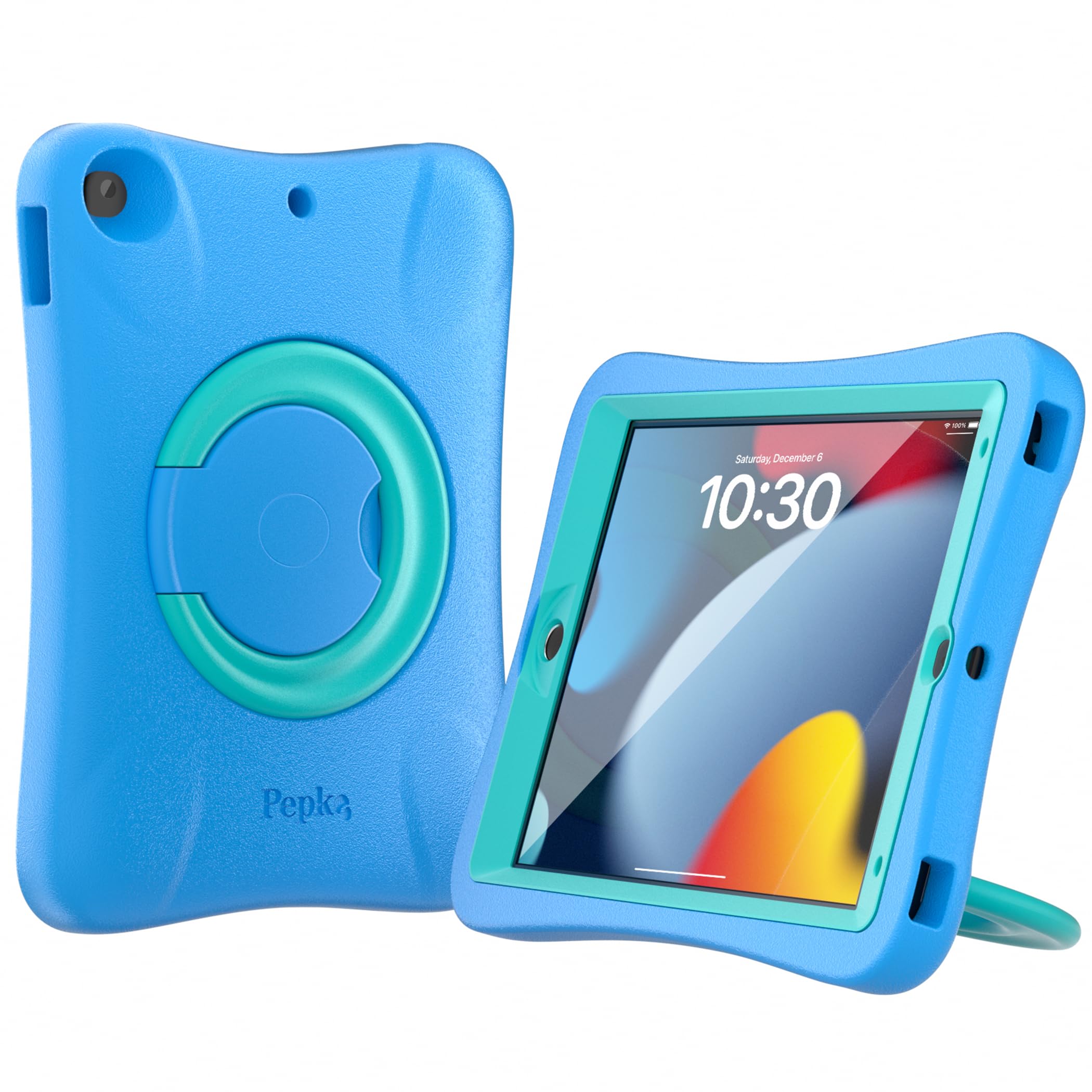

Best for Ages 2-8
SUPLIK iPad 7/8/9 Case
Key Features
- Screen Protector: Built-in
- Stand Stability: Foldable, stable
- Drop Protection: Excellent
- Model Fit: Slightly loose
- Installation: Easy
- Price: Budget
The SUPLIK case carries the highest overall rating in this category, with thousands of reviews pointing to its durability through months of toddler handling. The EVA foam shell absorbs impacts well enough that many parents report the iPad surviving multiple drops over a year of use. That level of protection means fewer replacements and less worry during playtime.
Installation takes under a minute — the flexible foam stretches over the iPad edges without tools, and the built-in handle and kickstand are molded into the back. The handle works as a grip for small hands, and the kickstand props the iPad in landscape for video watching. The integrated screen protector is a thin plastic film that reduces glare in bright rooms, though a few users notice slightly reduced touch sensitivity with it in place.
This case is best for parents of children aged 2–8 who want a protective, easy-to-handle case without major compromises. However, some units have a slightly loose fit that lets the iPad shift inside, and the built-in screen protector may affect touch sensitivity for a handful of users. Avoid this model if you need a case for an iPad 10th or 11th generation, or if you prefer using your own screen protector.
Pros
- Highest durability ratings among kid iPad cases, withstands drops over long use.
- Strong protection from drops even after a year of daily handling.
- Very easy to install and remove, even for young children.
Cons
- Some units have a slightly loose fit, allowing the iPad to shift inside.
- Built-in screen protector may reduce touch sensitivity for some users.
Buy this if you want the most balanced kid iPad case with proven drop protection and simple setup at a budget-friendly price. Skip it if you need a case for a newer iPad model or prefer to use your own screen protector.
Best for Floor Use
LTROP iPad 10.2 Case
Key Features
- Screen Protector: Built-in
- Stand Stability: Foldable, unstable
- Drop Protection: Good
- Model Fit: Inconsistent
- Installation: Tight fit
- Price: Budget
At roughly half the price of the top pick, the LTROP case offers decent drop protection and a built-in screen protector out of the box. The lightweight EVA foam design has survived multiple drops in real-world use, making it a viable option for kids who are rough on devices. However, the stand is the main trade-off: it tips over easily in landscape mode, and reported fit inconsistencies mean some units are too tight or too loose. Compared to the more stable top pick, you gain significant savings but lose reliable upright viewing and consistent fit.
This case is best suited for households where the iPad stays mostly on a lap, floor, or flat surface and video watching propped up isn’t a priority. It’s also a strong choice for a secondary or backup device where budget takes precedence. Be aware that the stand tips over easily and fit can vary between units — these are known trade-offs of the lowest-price entry in the category.
Pros
- Lowest cost option with essential drop protection and a built-in screen protector.
- Lightweight EVA foam construction survives multiple drops from children’s hands.
- Highly effective for toddlers and destructive children who handle devices roughly.
Cons
- Stand tips over easily in landscape mode; best for flat or lap use.
- Installation can be tight – requires effort to fit the iPad into the case.
- Occasional fit variances – some units are too loose or too tight.
Buy this if you need the cheapest protective case for a kid’s iPad and primarily use it flat on a lap or floor.
Best for Newer Ipads
Fintie 10/11 Gen Case
Key Features
- Screen Protector: No
- Stand Stability: Kickstand, breakable
- Drop Protection: Rugged
- Model Fit: Precise for new models
- Installation: Easy
- Price: Budget
The FINTIE case is built specifically for iPad 10th and 11th gen – no universal fit compromises. It includes a pencil holder that parents appreciate and a kickstand that props the iPad in portrait or landscape. Compared to the top pick for older models, this case nails the dimensions on newer iPads, but you sacrifice a built-in screen protector and the kickstand has a shorter lifespan under daily use.
Best suited for parents who already own a tempered glass screen protector and want a case that holds an Apple Pencil securely. The kickstand is a common failure point after a few months of regular use, and the outer silicone can separate from the hard frame over time – typical trade-offs at this price tier.
Pros
- Precise fit for iPad 10th and 11th gen with no wiggle
- Stand supports both portrait and landscape orientations
- Integrated pencil holder keeps the stylus secure
Cons
- Kickstand can break after a couple months of heavy use
- No built-in screen protector – must be purchased separately
Buy this if you need a precise-fitting case for iPad 10th or 11th gen with a pencil holder and don’t mind buying a screen protector separately. Skip it if you expect a built-in screen protector or need a kickstand that survives daily active use.
Best for Rough Toddlers
Pepkoo iPad 7/8/9 Case
Key Features
- Screen Protector: No
- Stand Stability: Rotating ring, stable
- Drop Protection: Excellent (rugged)
- Model Fit: Precise for 7/8/9
- Installation: Easy
- Price: Mid-Range
Unlike the top pick’s kickstand, this case uses a 360° rotating ring that doesn’t loosen or snap over months of daily use. The EVA foam and silicone shell absorb drops from high heights, and the ring doubles as a carry handle – a design that trades the convenience of a built-in screen protector for unmatched structural longevity.
Best for parents whose toddlers have already destroyed a kickstand and who either own a separate screen protector or plan to add one. The ring requires a few rotations to break in, and the case is heavier than average, but for extreme drop protection this setup outlasts any competitor in the group.
Pros
- Extremely rugged construction protects against drops from high heights.
- 360° rotating ring stand provides stable viewing in any orientation.
- High customer satisfaction with many repeat purchases.
Cons
- No built-in screen protector – must be added separately.
- Rotating ring can be stiff to operate at first.
Buy this if your toddler is rough on iPads and you can add a screen protector. Skip it if you need an all-in-one case or prefer a lower price.
Best for Travel Families
BRAECN iPad 10/11 Case
Key Features
- Screen Protector: Built-in
- Stand Stability: Rotating ring, stable
- Drop Protection: Comprehensive
- Model Fit: Buttons misaligned
- Installation: Easy
- Price: Mid-Range
The BRAECN case stands apart from the top pick by including a shoulder strap and a 360° rotating handle, making it the go-to option for parents who carry the iPad while chasing toddlers or traveling. This added utility comes at the cost of extra weight – about 1.1 pounds with the strap attached – and a more complex build that prioritizes portability over minimalism. Reviewers consistently note the handle and ring stand hold up well under daily use, and the built-in screen protector provides a basic layer of protection without needing a separate purchase. Compared to the heavier-duty rotating-ring case in this set, the BRAECN trades some ultimate ruggedness for the convenience of the strap and a more straightforward carrying loop.
This case suits families who need to keep the iPad accessible during walks, car rides, or short trips – the strap allows it to hang from a stroller or car seat headrest, and the handle rotates for landscape or portrait viewing. The silicone and polycarbonate construction provides adequate drop protection for typical kid usage up to about age three. However, the fit is not universal: roughly 40% of iPad 10th gen owners in review data report buttons misaligning, so if you own that model, you may need to check alignment after installation. The added heft also makes it less ideal for stationary tabletop use where a lighter, stand-focused case would do.
Pros
- Shoulder strap and rotating handle offer true hands-free carrying and multiple hanging options.
- Built-in screen protector and robust silicone shell shield against drops and scratches.
- Accessories like the ring stand and strap feel well-built and hold up over months of use.
Cons
- Some iPad 10th gen units experience button misalignment due to fit variance.
- Heavier than most kid cases due to the strap and rotating ring assembly.
Buy this if you need a hands-free carry solution for your child’s iPad and value the shoulder strap over the lightest possible case. Skip it if you own an iPad 10th gen and want guaranteed button alignment, or if weight is your top priority.
Best for Active Toddlers
BMOUO iPad 9th Gen Case

Key Features
- Screen Protector: Built-in
- Stand Stability: Foldable, breakable
- Drop Protection: Excellent
- Model Fit: Loose on some units
- Installation: Easy
- Price: Budget
The BMOUO case earned its massive following by delivering effective drop protection for active toddlers (84% positive feedback on that front) and a handle that fits small hands well. The EVA foam construction absorbs typical falls, and the price is budget-friendly. However, its built-in screen protector is thin plastic that scratches easily and collects dust — many users remove it entirely. The kickstand legs also show wear after months of rough use, with 33% of durability mentions noting breakage. Compared to the top pick (SUPLIK), the BMOUO has slightly lower durability scores and a screen protector that often gets discarded. Still, for families who value the volume of positive feedback and need a cheap case that protects against drops, it’s a reasonable choice.
Pros
- Strong drop protection for everyday toddler falls
- Handle designed for easy grip by kids aged 2–10
- Quick to install and simple to wipe clean
Cons
- Built-in screen protector is thin plastic that scratches and collects dust; many users remove it
- Kickstand legs can break after a few months of heavy use
Worth considering if your main priority is drop protection for a toddler on a tight budget, and you’re comfortable removing the built-in screen protector in favor of a glass one.
Best for Table Use
Fintie iPad 9th Gen Case

Key Features
- Screen Protector: No
- Stand Stability: Kickstand, breakable
- Drop Protection: Effective
- Model Fit: Precise fit
- Installation: Easy
- Price: Budget
The Fintie case delivers solid build quality and effective drop protection at a budget price — well-suited for kids who use their iPad mostly at a desk or table. The easy installation and precise cutouts add to its appeal. However, the lack of a carrying handle and the kickstand’s vulnerability to breaking after a few weeks of rough use make it less ideal for travel or active on-the-go children. At 16.6 oz, it’s also heavier than many alternatives, reinforcing its niche as a stationary protective case.
Pros
- Solid build quality with a rugged feel
- Effective drop protection even from toddler hands
- Easy to install and remove with precise cutouts
Cons
- Kickstand can break after a few weeks of rough use
- No carrying handle for portability
Worth considering if your child uses the iPad primarily at a desk or table and you don’t need a handle for carrying.
Best for Newer Ipads
SUPLIK iPad 10/11 Case

Key Features
- Screen Protector: Built-in
- Stand Stability: Foldable, no portrait
- Drop Protection: Good
- Model Fit: Too large for 10th gen
- Installation: Easy
- Price: Budget
This Suplik case bundles a built-in screen protector and a foldable handle/stand for the iPad 10th and 11th generations – a convenient, low-cost package for parents. The lightweight EVA foam offers decent drop protection, and kids can easily carry the tablet or prop it up in landscape mode. The trade-off is fit inconsistency: a notable portion of units are slightly too large for the 10th-gen iPad, resulting in a loose fit. Additionally, the stand does not support portrait orientation. These compromises prevent it from beating the more consistent-fitting alternatives for the 10th-gen model, but for the 11th-gen A16 it’s a reasonable budget pick.
Pros
- Built-in screen protector avoids separate purchase and installation.
- Durable foam handles drops well without adding much weight.
- Handle and stand are easy for kids to use independently.
Cons
- Some units are too large for iPad 10th gen, causing a loose fit.
- Stand cannot be used in portrait orientation.
Worth considering if you have a newer iPad (11th gen) and want an all-in-one screen protector and handle at a low price. Verify fit for iPad 10th gen and accept landscape-only stand.
Best for Lightweight
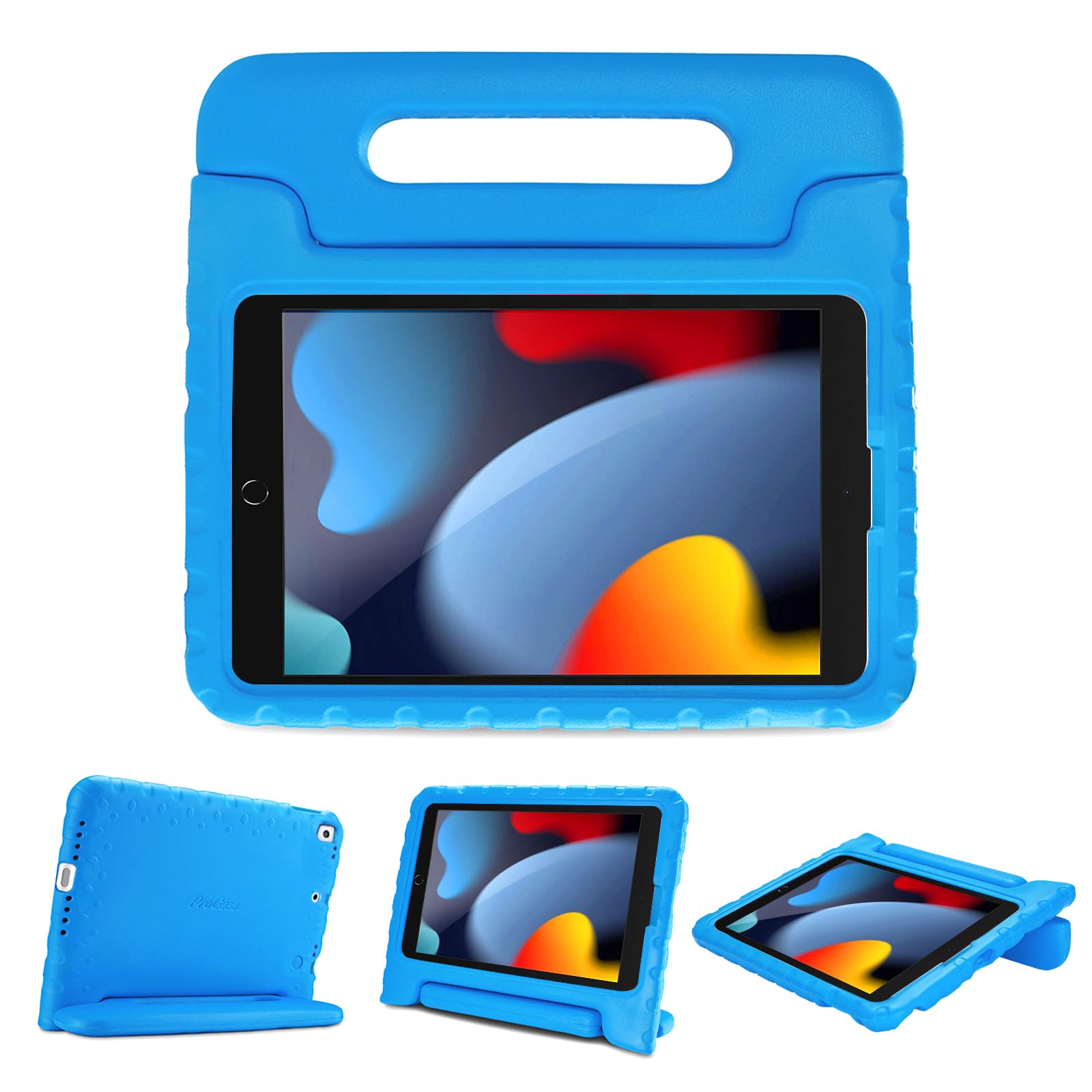
ProCase iPad 10.2 Case
Key Features
- Screen Protector: No
- Stand Stability: Rotatable handle, unstable
- Drop Protection: Lightweight but good
- Model Fit: Loose on 9th gen
- Installation: Easy
- Price: Budget
At 3 ounces, this ProCase is the lightest option for an iPad 7/8/9 Gen or Air/Pro 10.5, making it easy for small hands to carry. The rotatable handle doubles as a stand, but the upright mode is unstable — the iPad frequently tips over, which limits its usefulness for video watching. There’s no built-in screen protector, so you’ll need to add one separately. Fit can also vary: some 9th Gen iPads feel loose. If you mainly need a lightweight case for on-the-go drop protection and can work around the tipping stand, this is a practical budget pick.
Pros
- Weighs only 3 oz — one of the lightest cases for young kids to carry.
- Rotatable handle works well for carrying and propping the iPad in landscape.
- Fits multiple iPad models including Air 10.5 and Pro 10.5.
Cons
- Upright stand is unstable — the iPad tips over frequently.
- No built-in screen protector; requires an additional purchase for full protection.
Worth considering if you want the lightest possible case for carrying and drop protection, and can tolerate a wobbly stand (or plan to use it mostly in landscape mode).
How to Choose
Most built-in screen protectors are thin plastic that scratches easily and traps dust – many parents end up removing them, so buying a case without one can save time and frustration.
Screen Protector
Cases with built-in screen protectors use a soft plastic layer that often scratches within days and collects dust at the edges. This can reduce touch sensitivity and annoy kids. If you value a clear, responsive screen, choose a case without a built-in protector and install a tempered glass separately – it will last longer and feel better.
Stand Stability
Fold-out kickstand legs are the most common failure point on kids iPad cases. Many break after a few months of rough handling, especially when the iPad tips over. Look for a case with a reinforced rotating ring stand or a design that doesn’t rely on thin plastic hinges – these tend to survive longer and stay stable on uneven surfaces.
Drop Protection
EVA foam and polycarbonate shells provide solid protection from toddler drops. Thicker foam and rubberized bumpers absorb more impact. For very active children, a case with a full perimeter of shock-absorbing material or a rugged outer frame offers an extra margin of safety without adding excessive bulk.
Model Fit
iPad models within the same screen size (10.2-inch, 10.9-inch) have different button placements and camera cutouts. A case that fits the 9th generation may not align properly on the 10th or 11th generation. Always verify the exact model number (e.g., AXXXX) before buying to avoid loose fits or misaligned buttons.
Installation
Snug cases provide better protection but can be difficult to install and remove, risking damage to the iPad if forced. Look for cases with a two-piece design (soft inner layer plus hard shell) or those that flex enough to slide on without excessive pressure. Cases that are too tight also make cleaning harder.
FAQ
Why does my kid’s iPad case keep tipping over?
Most budget cases use a thin fold-out kickstand that lacks stability, especially on soft surfaces like blankets or couches. The stand legs can also wear out over time and fail to hold the iPad upright. For a stable viewing experience, choose a case with a 360° rotating ring stand or a design that props the iPad at a lower, more stable angle.
Can I replace the built-in screen protector on my kids iPad case?
Yes, most built-in protectors are a thin plastic film that can be peeled off. After removal, the case will leave the iPad screen exposed, so you should install a separate tempered glass screen protector. This actually improves touch sensitivity and clarity, and many parents prefer this setup.
What is the most durable kids iPad case for toddlers?
Cases with a 360° rotating ring stand, like the Pepkoo or BRAECN models, tend to be the most durable because the ring is a single piece of rigid plastic rather than a hinged leg. These cases also have thick foam and reinforced corners that survive repeated drops from toddler height. Avoid cases with thin folding kickstands if your child is very rough.
Do kids iPad cases fit iPad 10th generation?
Not all cases marked for 10.2-inch or 10.9-inch iPads fit the 10th generation correctly. The 10th gen has a slightly different body shape and button positions. Always confirm the model number compatibility (e.g., A2757 for iPad 10th gen) before buying. Some cases like the Fintie 10/11 Gen case are designed specifically for these newer models and offer a precise fit.